


Skip navigation
  1. Home
  2. Features
  3. Fill from an Excel file
Standard form filling

Fill Google Forms automatically with ready data from an Excel file

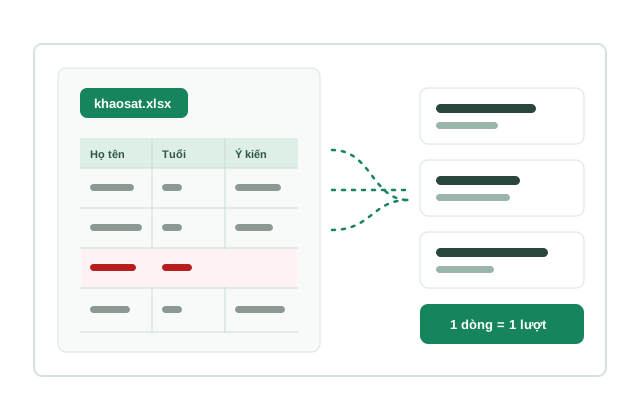
Already have data in Excel, such as typed-up paper surveys or a file from Google Sheets? Import the file; columns are matched to questions and each row is sent as exactly one Google Form response.

Fill from Excel illustration

Quick facts updated

Format
.xlsx, .xls, .csv (first row holds the question names)
Limits
Up to 5.000 rows per file
Cost
No surcharge; responses = valid rows × response price
Check
Bad rows reported with the reason; bad rows can be skipped
Questions without a column
Filled with the ratios set for the form
See it in the product

Every cell checked before ordering

After choosing the file, each column is matched to a question and problem cells are marked before you can order. The 1-minute 27-second video below is recorded on the real app.

5.000 Max rows / file
0 VND Import fee
1 rows = 1 responses
Choose file Column matching Fix bad rows Order
Column matching, bad-row reports, skipping bad rows
What it does

Use it when you already have the answers

Fill by ratios creates answers by percentage; Fill from Excel sends exactly the data you provide. It fits when you need paper surveys in Google Forms to combine everything in one place, to move data from an old form to a new one, or to load prepared test data to check a form. The file is read on your device; each cell is checked against the form's questions and choices before ordering.

Accepts .xlsx, .xls or .csv, up to 5.000 rows; the first row holds question names, each following row is one respondent.
The "Download this form's template" button creates a file with the right columns and an example sheet.
Columns are matched to questions by name; fix any wrong match and leave unused columns as "Don't use".
Reports the exact Excel row and reason for errors, including cells breaking the form's "Response validation" rules; "Skip bad rows" lets you order with the good rows.
Text that matches no choice goes into the "Other" box if the question has one; an email column is used when the form collects emails.
Questions not in the file are filled with the ratios set for the form.
No extra fee: you pay the normal response price, one response per valid row.
How it works

How to use Fill from Excel in 3 steps

The file is read on your device; only rows that pass the checks are sent.

  1. 1

    Choose the form and file

    Go to Fill forms → Fill from Excel, choose the form, download the template or drag in your file.

    Choose the form, look at the template, then drag in your Excel file
    Choose the form, look at the template, then drag in your Excel file
  2. 2

    Match columns and check

    Look at the column matching table, fix wrong matches and press "Check data & continue"; fix or skip bad rows.

    The table matching Excel columns to Google Form questions
    The table matching Excel columns to Google Form questions
  3. 3

    Order

    Go to the order page with a fixed number of responses equal to the rows, choose the schedule and pay.

    The order page with a fixed number of responses equal to the data rows
    The order page with a fixed number of responses equal to the data rows

What you need

  • The form was added to AutoFillForm with the Google Form edit link.
  • The file's first row holds question names; choice values should match the choice text exactly.
  • A file downloaded from Google Sheets (File → Download → Microsoft Excel) works as is.

Limits to know

  • Google Forms file-upload questions are not supported.
  • Bad cells are never fixed automatically; bad rows are reported so you can fix them in the file or skip them.
  • Only import data you are allowed to use, e.g. surveys you collected yourself.
Quick answers

Frequently asked questions

No. You pay the normal response price (2, 4 or 5 Credit/response by question count), one response per valid row in the file.
.xlsx, .xls or .csv, up to 5.000 rows. The first row holds question names, each following row is one respondent. Easiest: press "Download this form's template" and fill it in.
The exact Excel row and reason are shown, e.g. a choice that doesn't exist or a broken phone rule. Fix the file and import again, or press "Skip bad rows" to order with the good rows.
They are filled with the ratios set in the form's settings.
Yes. Download from Google Sheets as Microsoft Excel or CSV and import it like any file.
100 Credit for new accounts

Start with your form

Import, set up and see the cost before running.

Create a free account